
By using the Safety Analysis Recommendation feature in SafetyDesigner, you can identify the necessary actions to comply with human body part-specific force and pressure limits according to ISO TS 15066 or KOROS 1162-1 standards. For example, if a high risk is calculated due to the robot’s high speed, you can determine how much the robot’s speed needs to be reduced for each motion segment.
Additionally, for motion segments where the calculated force and pressure are below the standard threshold, you can determine how much the speed can be increased. Additionally, by using the Safety Analysis Recommendation feature, you can preview the risk levels before and after attaching soft covers to sharp or pointed areas of the end effector or the robot’s exterior.
The following section explains the detailed usage of the Safety Analysis Recommendation feature.
1. Safety Analysis Recommendation
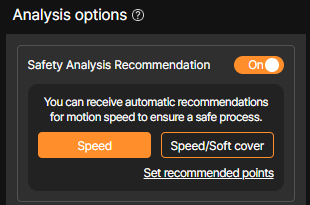
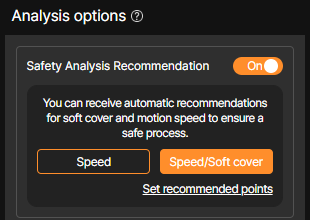
You can choose between adjusting the speed only or adjusting the speed with the assumption of attaching a soft cover when applying the Safety Analysis Recommendation feature.
1-1. Speed Adjustment Safety Analysis Recommendation
Speed adjustment
This is the default setting for the Safety Analysis Recommendation feature. When analysis is performed with the Speed selected, deceleration and acceleration values are recommended for each segment of the uploaded robot motion or for the waypoints of the robot motion generated in SafetyDesigner.
1-2. Safety Analysis Recommendation with Soft Cover and Speed Adjustment
Speed adjustment & Soft cover
When Speed/Soft cover is selected, the analysis assumes the attachment of a soft cover to areas where the collision expected points or robot joints exceed the pressure limits specified in the standards. Additionally, it provides recommended robot speed values based on the state with the soft cover applied.
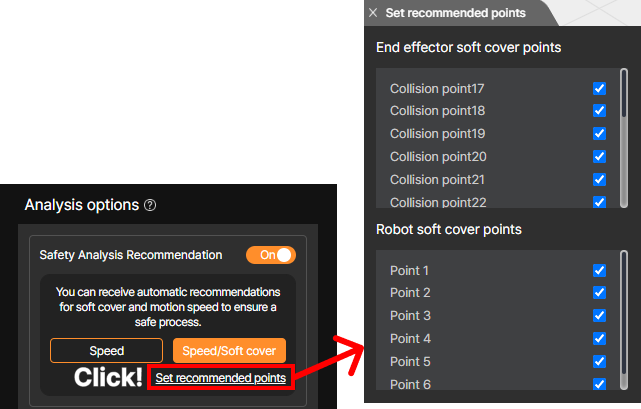
Speed/Soft cover – Set recommended points
The application of the soft cover is by default checked for all analysis points. However, in cases where there are specific application requirements (e.g., food processes sensitive to foreign material contamination) or when the end effector’s shape is complex (e.g., probing-type gripper corners) or the material prevents the attachment of the soft cover, even if the soft cover is recommended in the safety analysis results, it cannot actually be applied.
Therefore, the analysis is executed after excluding the collision expected points or robot joints where the soft cover cannot be attached from the checkboxes.
Tip
For more details about the soft cover, see What is Soft Cover? on the Handy Tips.
2. Safety Analysis Recommendation Results
The following section explains the comparison between the results with speed adjustment and the results with both speed adjustment and soft cover applied.
In the analysis graph below, you can compare the results of analyzing the same 3D application without applying the Safety Analysis Recommendation feature and the results after applying the Safety Analysis Recommendation feature.
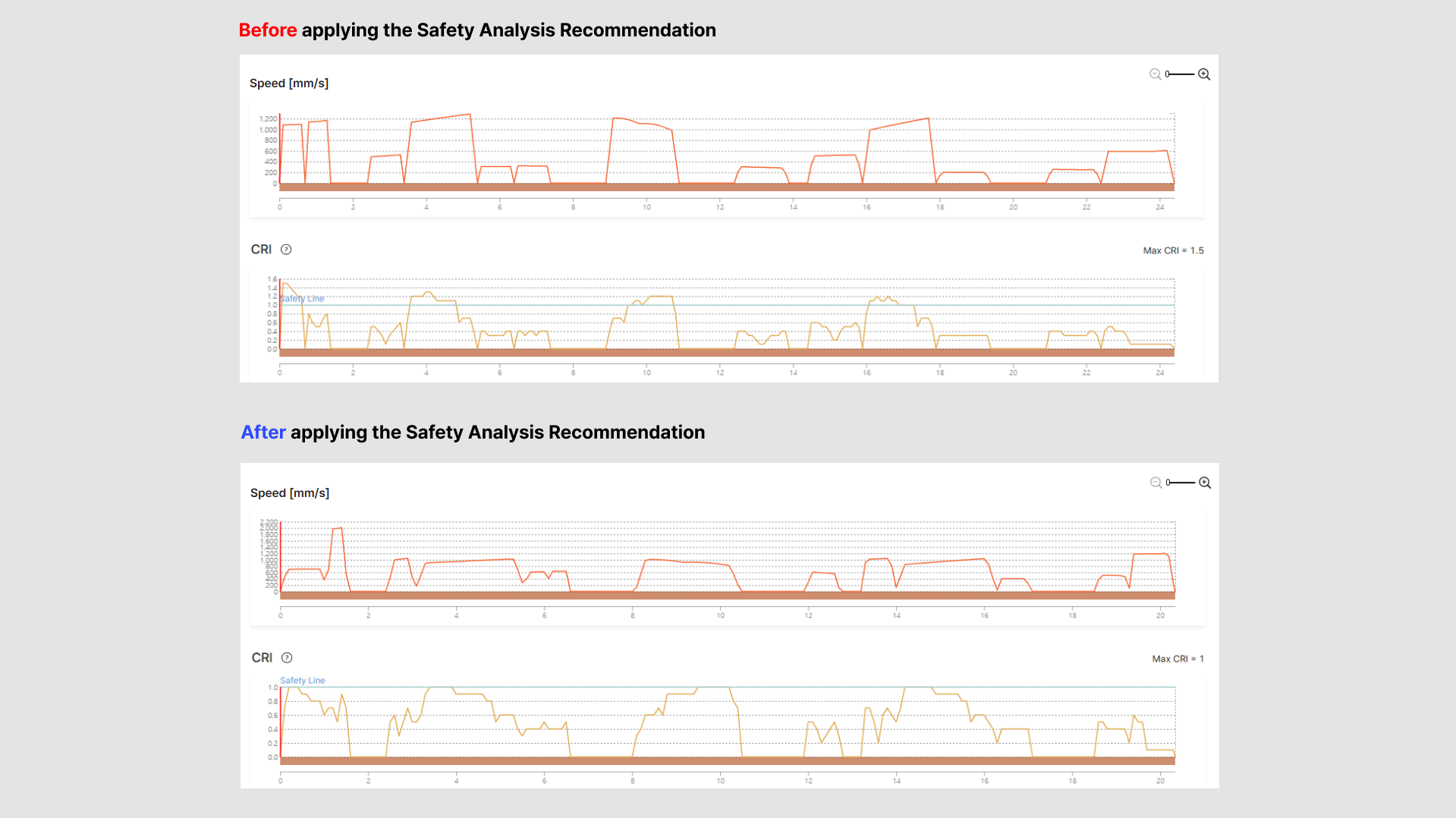
Comparison of Safety Analysis Recommendation – Before and after
Before applying the Safety Analysis Recommendation, the maximum CRI value exceeded the standard allowable limit at 1.5. After applying the feature, the maximum CRI value was adjusted to 1.
By accelerating in safer zones and decelerating in hazardous zones, safety was maintained while reducing the cycle time from 24 seconds to 20 seconds, resulting in improved productivity.
Additionally, detailed information about the attachment points of the soft cover applied during the Safety Analysis Recommendation, as well as the motion segments where speed adjustments are needed and their corresponding adjustment values, can be found in the layer window on the left side of the 3D screen.
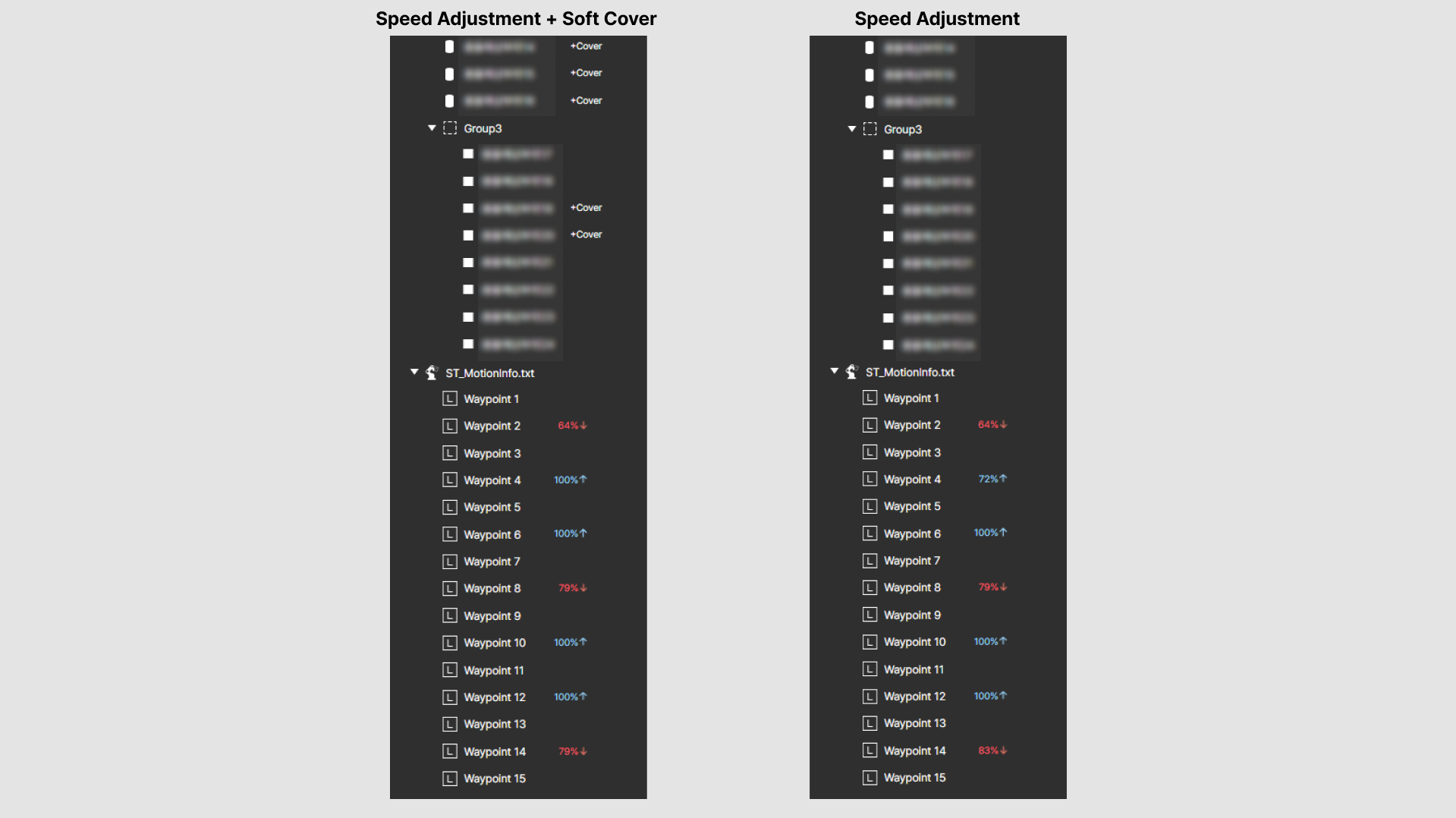
Comparison of Analysis Results – Layer Window on the 3D Screen
There is a difference in the analysis recommendation results between the case where both speed adjustment and soft cover are applied, and the case where only speed adjustment is applied. As shown in the example above, when the risk calculated from pressure results in a higher value, the attachment of a soft cover provides a greater expected benefit than deceleration.
Compared to the analysis result with only speed adjustment applied, the state with the soft cover attached shows relatively higher acceleration recommendation values and lower deceleration values.
Tip
The speed recommendation feature for robot motion segments in SafetyDesigner operates based on a waypoint estimation algorithm. In other words, the extracted waypoint estimation information for the motion may differ from the actual robot teaching data, so discrepancies may occur when adjusting the actual robot’s motion speed based on the safety analysis results.
Warning
Soft cover used in the collision risk analysis in SafetyDesigner is based on the material properties and shape of the shock-absorbing material produced by Safetics. Therefore, if a user attaches any arbitrary shock-absorbing material to the actual robot, safety cannot be guaranteed.