
Skip to content
Help Center

Help Center

Safetics
⌘K
Home Open SafetyDesigner
🇺🇸 English
English 한국어

To start

  • What is SafetyDesigner?
  • Sign Up and Login
  • Home Screen
  • Edit Account Information
  • Create Project and Application

3D Application Design & Simulation Analysis

  • 3D Screen Elements
  • Create Robots
  • Input Analysis Information
  • Analysis Result
  • Collision Risk Analysis Report issuance
  • Application Sharing
  • Trash bin

Robot System Risk Assessment

  • Risk Assessment Screen Layout
  • Step 1. Risk Assessment Information
  • Step 2. Workspace Configuration
  • Step 3. Identify Hazardous Factors
  • Step 4. Evaluate Risks and Reduction Plans
  • Step 5. Generate Report

Advanced Tips

  • What is Safety Analysis Recommendation?
  • What is 3D Mesher?
  • What are Safety Spaces?
  • What is Motion Create?
  • What is Motion Split?
  • What is Collision Point?
  • What is Soft cover?

Motion Extractor Program Guide

  • Download and Launch
  • Select Robot
  • Network Connection Settings
  • Extracting and Verifying Motion

Group Management Guide

  • Group Management
  • Group Service Use Management
  • Contract Management
  • Help Center
  • Step 3. Identify Hazardous Factors

Step 3. Identify Hazardous Factors

List
  • 1. Hazardous Factors Status
    • ① Edit Process/Equipment Information
    • ② Check Recommendations
    • ③ Survey List

1. Hazardous Factors Status

On this page, you can view the list of survey items automatically generated based on the robot application type (e.g., palletizing, pick-and-place, cooking, etc.) and the equipment and safety measure selections made in Step 1. Risk assessment information.
The first page of the Identify hazardous factors step shows the total number of survey items. All survey items related to each hazardous factor must be completed before generating the risk assessment report.
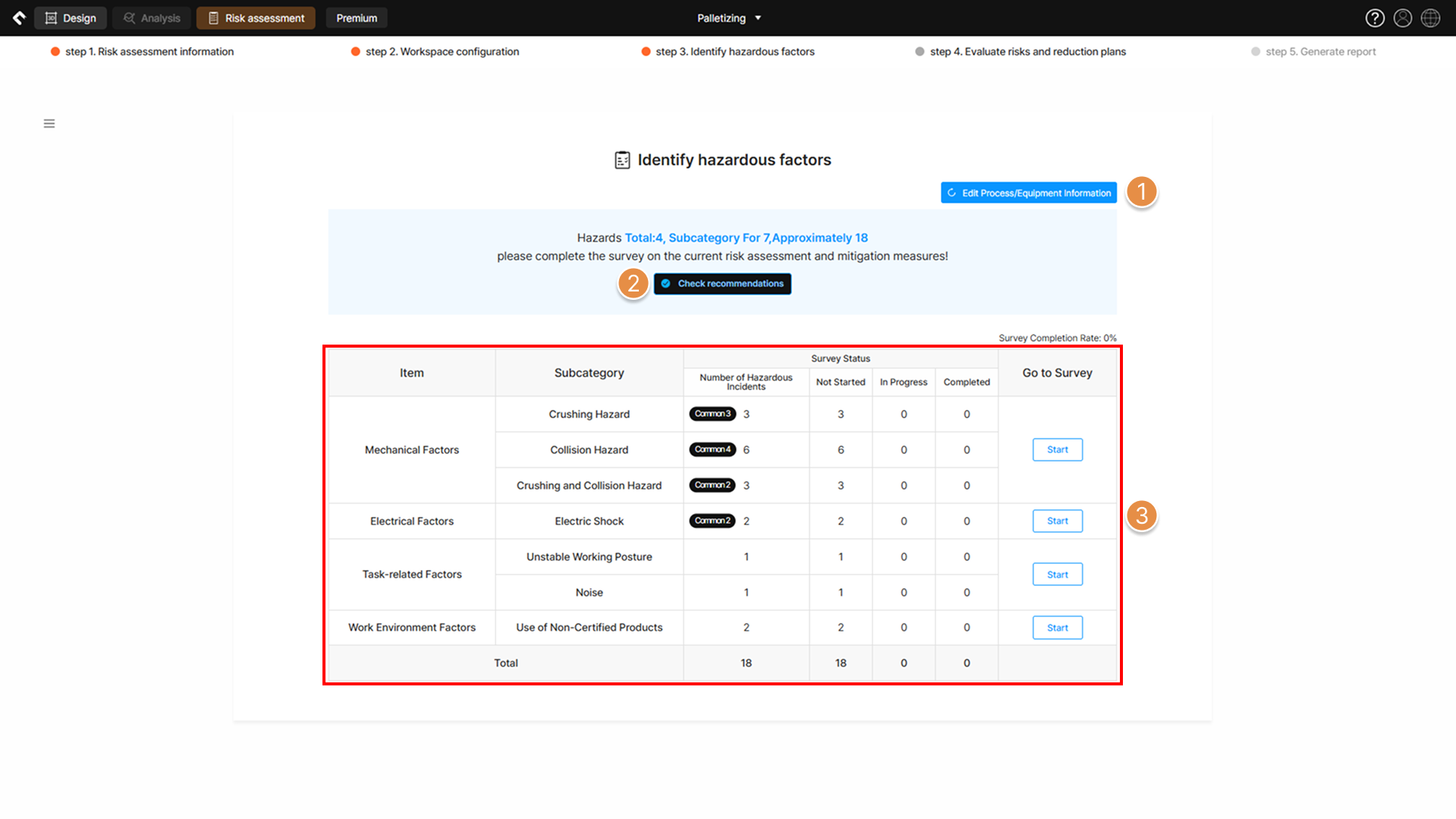
Step 3 – Identify hazardous factors

① Edit Process/Equipment Information

To modify the risk assessment survey items or change the target equipment for risk assessment, return to the Equipment and Safety Measure List page in Step 1. Risk assessment information.

② Check Recommendations
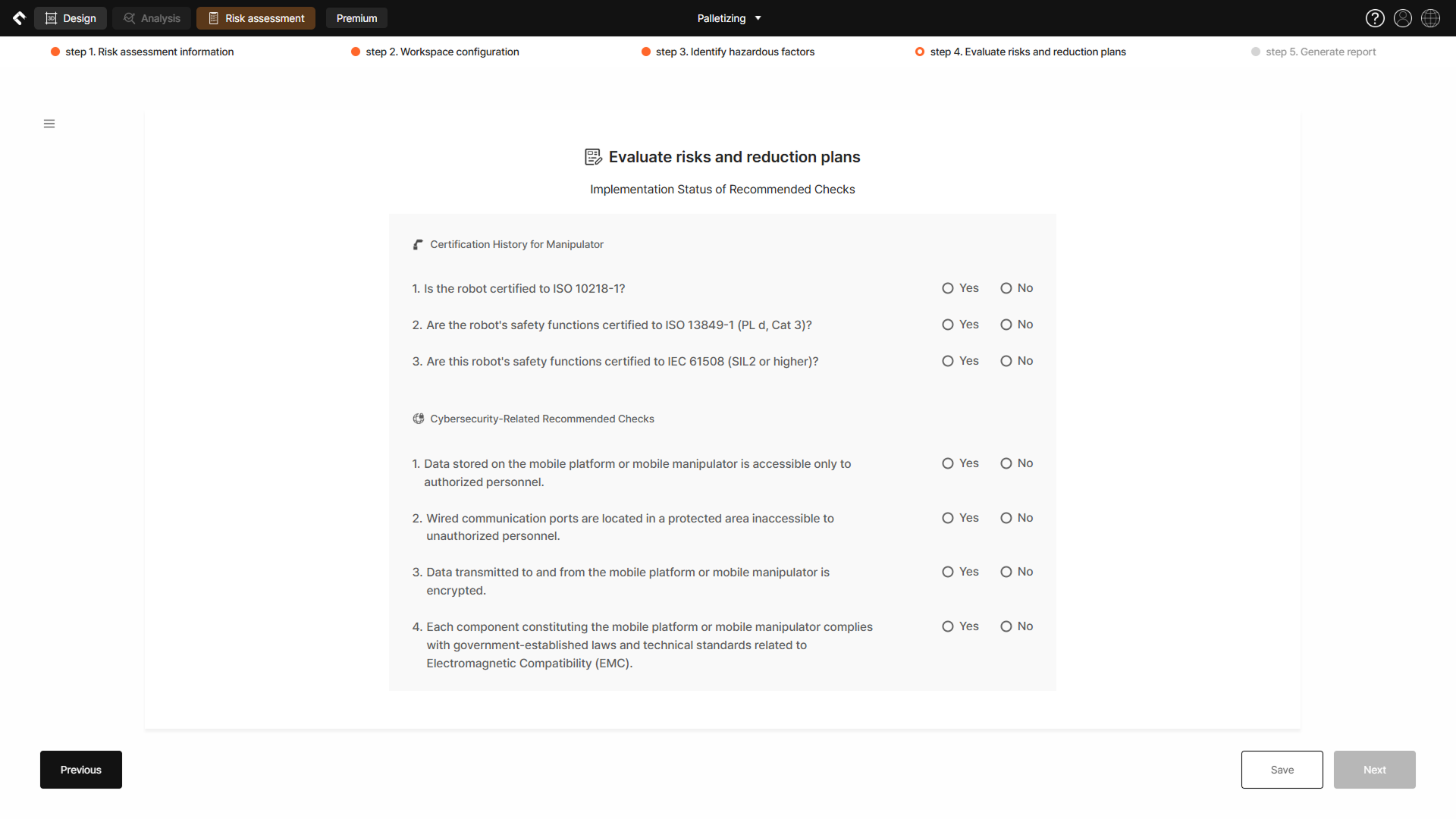
Information regarding certification and safety-related requirements, specific to robot type, is provided. If ‘Yes’ is answered to a survey item, relevant certificates and supporting documents must be obtained and attached as an appendix to the Risk Assessment Report.

③ Survey List

Check the available survey list and the total number of survey items. Click the Start button to move to the survey list page (Step 4. Evaluate risks and reduction plans) for the selected hazardous factor.

Tip

Common survey items refer to mandatory survey questions required to identify hazardous factors at robot installation sites, regardless of the selections made in Step 1. Risk assessment information.

Updated on June 10, 2026
Step 2. Workspace ConfigurationStep 4. Evaluate Risks and Reduction Plans
List
  • 1. Hazardous Factors Status
    • ① Edit Process/Equipment Information
    • ② Check Recommendations
    • ③ Survey List
Safetics Safetics

Robot safety made simple

Product

SafetyDesigner Pricing

Guides

SafetyDesigner Guide Group Management Motion Extractor Advanced Tips

Resources

Insights FAQ Glossary

Company

Safetics Home Contact Us

Safetics Inc. · CEO : Heonseop Shin · Business Reg. No. 693-87-01568 · 2F, 43, Bongeunsa-ro 30-gil, Gangnam-gu, Seoul, Republic of Korea · Tel : 82-2-568-7985 · info@safetics.io

© 2026 Safetics, Inc.

Image you just passed