
Skip to content
Help Center

Help Center

Safetics
⌘K
Home Open SafetyDesigner
🇺🇸 English
English 한국어

TBM Admin

  • Key Terms & Concepts
  • 1.1 Log In
  • 1.2 Understanding the Layout
  • 1.3 Check Your Permissions
  • 2.1 Create a Form (Template)
  • 2.2 Schedule a TBM Send
  • 2.3 View & Edit Scheduled Sends
  • 2.4 Check Participation Status
  • 2.5 Remind Non-Responders (Push Resend)
  • 3.1 Bulk-Add Form Items (Excel)
  • 3.2 Edit, Restore & Delete Forms
  • 3.3 Manage Workers (Regular)
  • 3.4 Manage External Workers (Day Labor)
  • 3.5 Manage Dispatch
  • 4.1 SOS & Emergency Response
  • 4.2 View & Filter Complaints
  • 4.3 Handle Complaints
  • 5.1 Roles & Permissions
  • 5.2 Manage Plants (Sites)
  • 5.3 Default TBM Settings
  • 5.4 Invitations & User Management
  • A. Frequently Asked Questions (FAQ)
  • B. Permission Matrix
  • C. Glossary
  • D. Error Message Reference
← Back

4.1 SOS & Emergency Response

Complaint Management All

Check SOS and work stop reports from the field before anything else, and take action.
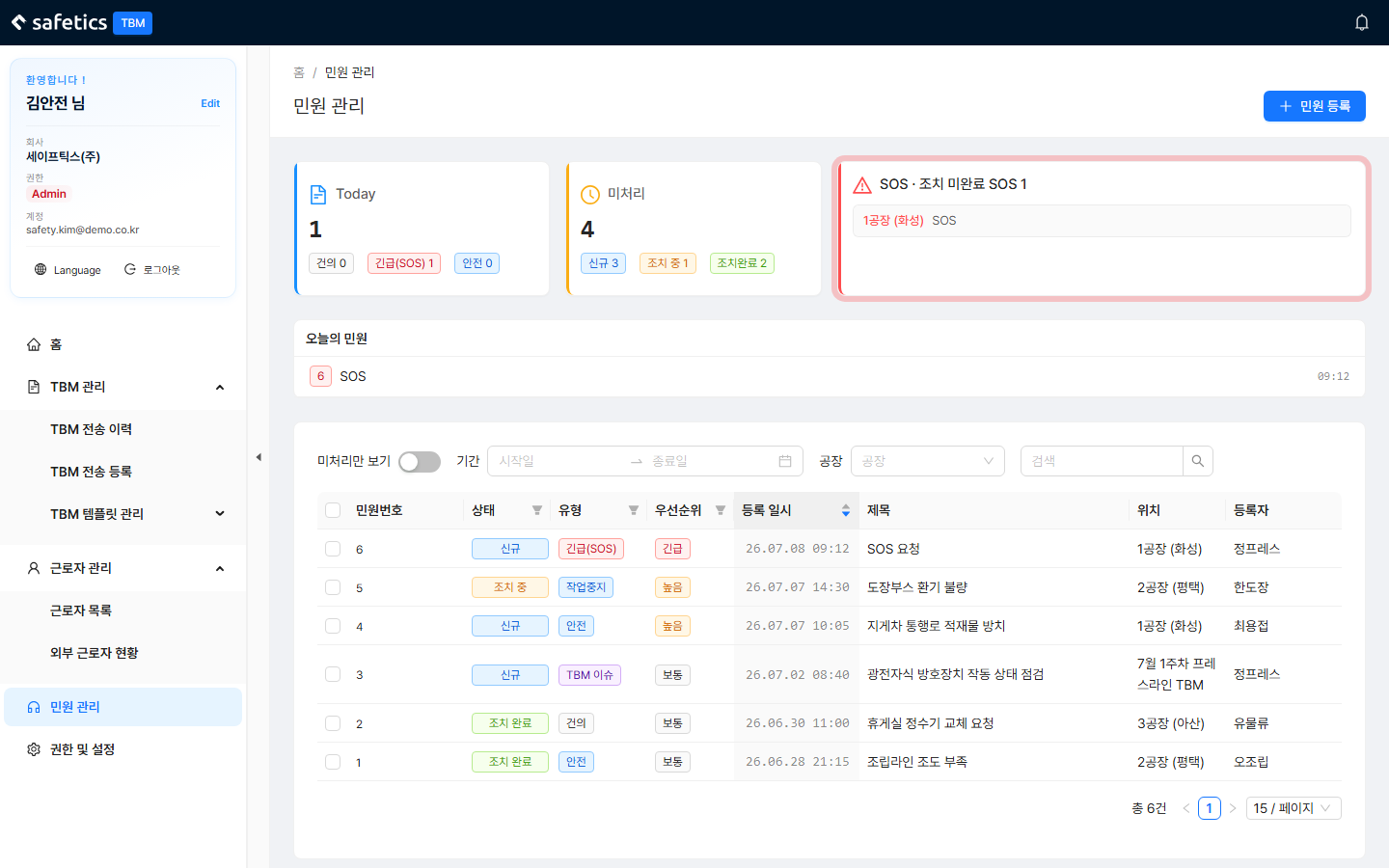
Complaint Management – status cards at the top (Today/Unresolved/SOS) + list

Complaint Management – status cards at the top (Today/Unresolved/SOS) + list

  1. When an SOS comes in, you can tell from the notification bell (SOS mark) and the SOS card at the top of Complaint Management (blinking).
  2. Click the SOS card or the notification to open the details.
  3. Check the content, location, and reporter, then respond on site.
  4. Record what you did in the action history (comments). Posting a comment automatically changes the status to “In Progress”.
  5. Once the situation is over, click Change Status to Resolved.

Danger

  • SOS complaints cannot be deleted, even by an Admin (records are preserved).
  • Who receives emergency notifications (SOS / work stop) is managed with the “Receive emergency notifications” item in 5.1 Roles & Permissions.
  • Each plant’s SOS contact and work stop manager are assigned in 5.2 Manage Plants (Sites).
← Previous3.5 Manage DispatchNext →4.2 View & Filter Complaints
Safetics Safetics

Robot safety made simple

Product

SafetyDesigner Pricing

Guides

SafetyDesigner Guide TBM Guide

Resources

Insights FAQ Glossary

Company

Safetics Home Contact Us

Safetics Inc. · CEO : Heonseop Shin · Business Reg. No. 693-87-01568 · 2F, 43, Bongeunsa-ro 30-gil, Gangnam-gu, Seoul, Republic of Korea · Tel : 82-2-568-7985 · info@safetics.io

© 2026 Safetics, Inc.

Image you just passed