
Skip to content
Help Center

Help Center

Safetics
⌘K
Home Open SafetyDesigner
🇺🇸 English
English 한국어

TBM Admin

  • Key Terms & Concepts
  • 1.1 Log In
  • 1.2 Understanding the Layout
  • 1.3 Check Your Permissions
  • 2.1 Create a Form (Template)
  • 2.2 Schedule a TBM Send
  • 2.3 View & Edit Scheduled Sends
  • 2.4 Check Participation Status
  • 2.5 Remind Non-Responders (Push Resend)
  • 3.1 Bulk-Add Form Items (Excel)
  • 3.2 Edit, Restore & Delete Forms
  • 3.3 Manage Workers (Regular)
  • 3.4 Manage External Workers (Day Labor)
  • 3.5 Manage Dispatch
  • 4.1 SOS & Emergency Response
  • 4.2 View & Filter Complaints
  • 4.3 Handle Complaints
  • 5.1 Roles & Permissions
  • 5.2 Manage Plants (Sites)
  • 5.3 Default TBM Settings
  • 5.4 Invitations & User Management
  • A. Frequently Asked Questions (FAQ)
  • B. Permission Matrix
  • C. Glossary
  • D. Error Message Reference
← Back

3.2 Edit, Restore & Delete Forms

TBM Management > Template List Manager or higher

Find a form you made earlier and fix its content or delete it.
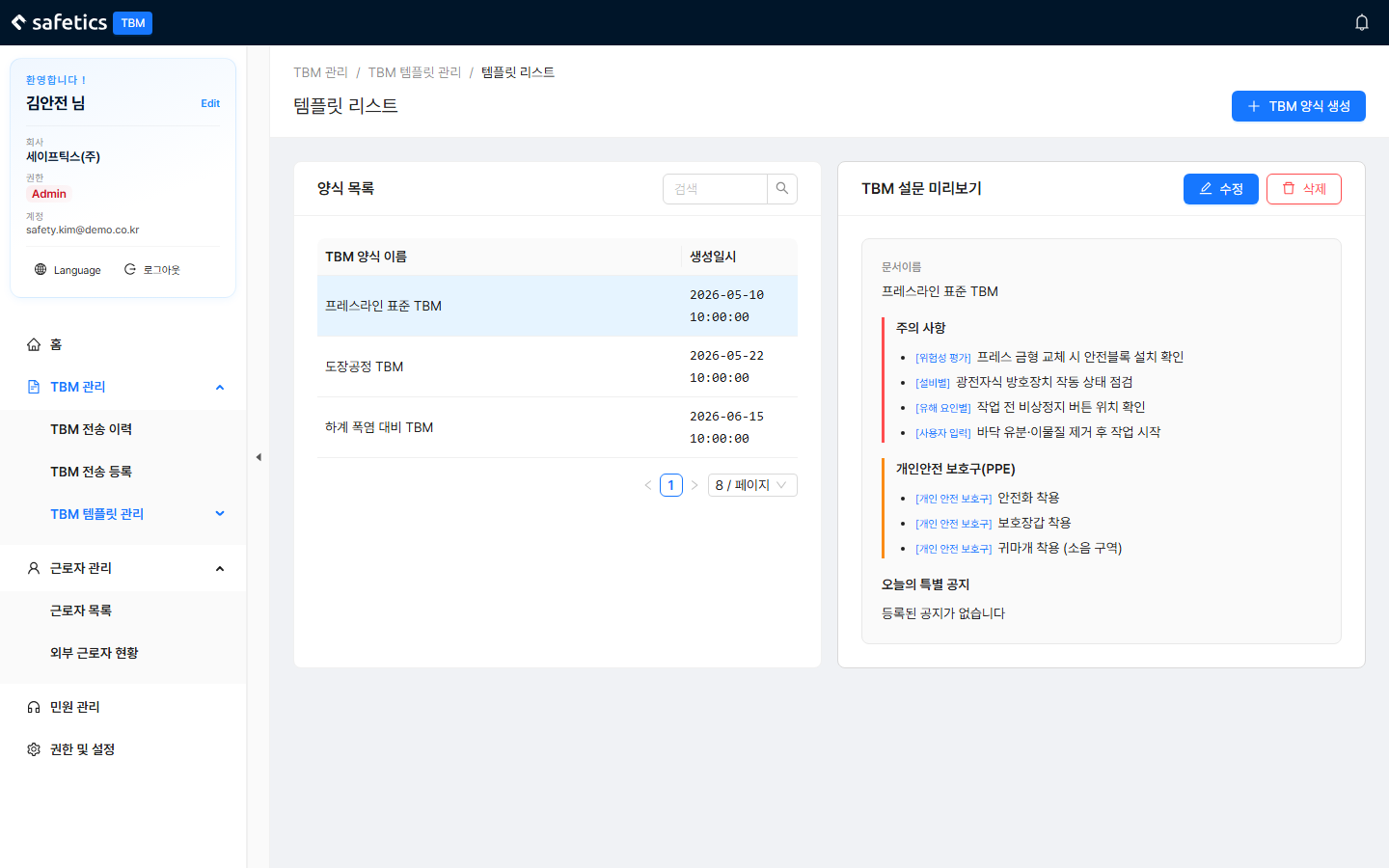
Template List – left: list / right: preview

Template List – left: list / right: preview

  1. In Template List, search by form name; click a row to show its preview (document name, precautions, PPE, special notice) on the right.
  2. To change the content, click Edit — the same screen as form creation opens in edit mode.
  3. While editing, click Revert to restore the original, or Cancel to stop editing.
  4. To delete the form, click Delete → confirm “Do you want to delete this form?”.

Warning

A warning banner appears at the top of the edit screen. TBMs that were already sent are not affected, but if a “Scheduled” send uses this form, its content may change — check before you edit.

← Previous3.1 Bulk-Add Form Items (Excel)Next →3.3 Manage Workers (Regular)
Safetics Safetics

Robot safety made simple

Product

SafetyDesigner Pricing

Guides

SafetyDesigner Guide TBM Guide

Resources

Insights FAQ Glossary

Company

Safetics Home Contact Us

Safetics Inc. · CEO : Heonseop Shin · Business Reg. No. 693-87-01568 · 2F, 43, Bongeunsa-ro 30-gil, Gangnam-gu, Seoul, Republic of Korea · Tel : 82-2-568-7985 · info@safetics.io

© 2026 Safetics, Inc.

Image you just passed