
Skip to content
Help Center

Help Center

Safetics
⌘K
Home Open SafetyDesigner
🇺🇸 English
English 한국어

TBM Admin

  • Key Terms & Concepts
  • 1.1 Log In
  • 1.2 Understanding the Layout
  • 1.3 Check Your Permissions
  • 2.1 Create a Form (Template)
  • 2.2 Schedule a TBM Send
  • 2.3 View & Edit Scheduled Sends
  • 2.4 Check Participation Status
  • 2.5 Remind Non-Responders (Push Resend)
  • 3.1 Bulk-Add Form Items (Excel)
  • 3.2 Edit, Restore & Delete Forms
  • 3.3 Manage Workers (Regular)
  • 3.4 Manage External Workers (Day Labor)
  • 3.5 Manage Dispatch
  • 4.1 SOS & Emergency Response
  • 4.2 View & Filter Complaints
  • 4.3 Handle Complaints
  • 5.1 Roles & Permissions
  • 5.2 Manage Plants (Sites)
  • 5.3 Default TBM Settings
  • 5.4 Invitations & User Management
  • A. Frequently Asked Questions (FAQ)
  • B. Permission Matrix
  • C. Glossary
  • D. Error Message Reference
← Back

3.4 Manage External Workers (Day Labor)

Worker Management > External Worker Status Manager or higher

Check day laborers’ work and TBM participation status, and manage each plant’s access code.
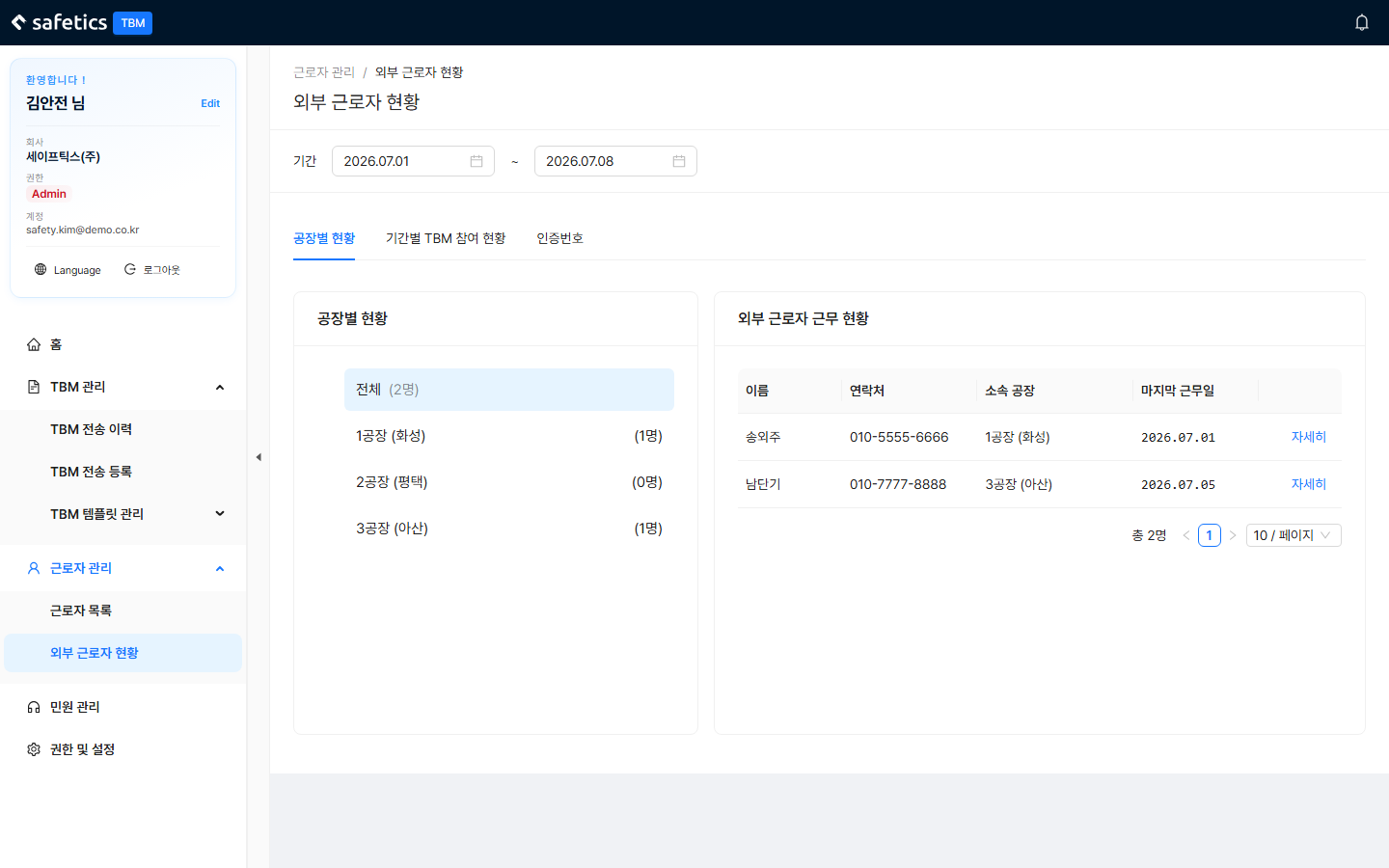
External Worker Status – period filter at the top + 3 tabs

External Worker Status – period filter at the top + 3 tabs

Pick the period (start date–end date) at the top first, then use the 3 tabs:

① Status by Plant

  • Plant tree on the left (with headcount) → external worker work status (name, contact, affiliation, last work date) → detail card (including TBM participation history)
  • Reset Credentials: resets that worker’s biometric authentication/PIN. Use it when they changed phones or cannot authenticate.

② TBM Participation by Period

  • A table that tallies the number of day laborers who joined TBMs by date × plant. Useful for reporting.

③ Access Codes

  1. Check each plant’s access code. (Issued automatically if there is none)
  2. If a code has been exposed, reissue it with Renew for one plant or Bulk Renew for all.
  3. Use Bulk Print to save the plant names + access codes as an A4 PDF and post it on site.

Concept

An access code is a per-plant code that an external worker enters in the mobile app to join that plant’s TBM. Renewing a code invalidates the previous one.

← Previous3.3 Manage Workers (Regular)Next →3.5 Manage Dispatch
Safetics Safetics

Robot safety made simple

Product

SafetyDesigner Pricing

Guides

SafetyDesigner Guide TBM Guide

Resources

Insights FAQ Glossary

Company

Safetics Home Contact Us

Safetics Inc. · CEO : Heonseop Shin · Business Reg. No. 693-87-01568 · 2F, 43, Bongeunsa-ro 30-gil, Gangnam-gu, Seoul, Republic of Korea · Tel : 82-2-568-7985 · info@safetics.io

© 2026 Safetics, Inc.

Image you just passed