
Manager or higher
Find people in the org chart, add or remove people at a plant, and change permissions.
 123
123
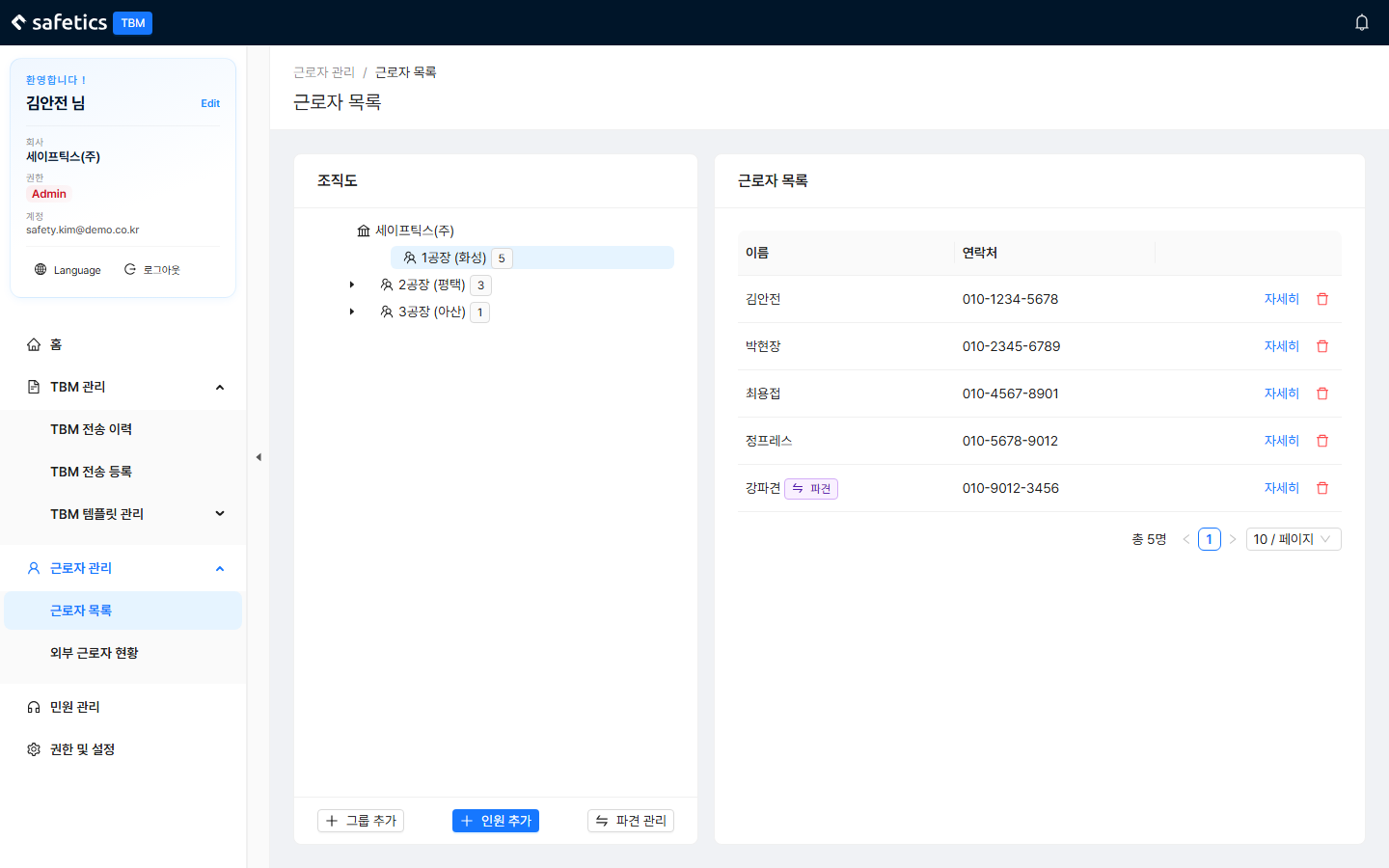
Worker List – left: org chart tree / right: people table & details
Find People
- Org chart tree on the left: company → plant → people. People not yet assigned to a plant are gathered under “No Group”.
- Click a person to see their details (name/email/contact/plant/job title/permission/registration date) and TBM participation history.
Add/Remove People at a Plant
- Select a plant in the tree. (The Add People and Manage Dispatch buttons are enabled only while a plant is selected)
- Click Add People → search in the modal → check several people → add.
- To remove someone, click the trash icon in the list → confirm. (They only leave the group; the account is kept)
Change Permissions (Roles)
- In the person’s details, click Edit and select a role.
- You can only change roles lower than your own. (Admin > Manager > Worker)
Warning
Adding a group (site) is Admin-only. If a Manager clicks Add Group, the message “Only an Admin can add a group (site).” appears. Admins add them in 5.2 Manage Plants (Sites).