
Skip to content
Help Center

Help Center

Safetics
⌘K
Home Open SafetyDesigner
🇺🇸 English
English 한국어

TBM App

  • Key Terms & Concepts
  • 1.1 Installation & Requirements
  • 1.2 Log In — Regular Workers (ID Login)
  • 1.3 Log In — External Workers (Access Code Login)
  • 1.4 Biometric & Auto Login
  • 1.5 Understanding the Layout
  • 1.6 Select a Site (Multiple Sites)
  • 2.1 Start Today’s TBM
  • 2.2 Answer the Checklist
  • 2.3 Complete Participation — Signature
  • 2.4 Complete Participation — Location Check (Geo-Fence)
  • 2.5 View Past TBM Records
  • 3.1 Submit a Suggestion
  • 3.2 View & Reply to Suggestions
  • 3.3 Accept/Decline Dispatch Invites
  • 3.4 Notification Settings
  • 3.5 Change Language (Korean/English)
  • 3.6 Log Out & Delete Account
  • 4.1 Report a Hazard
  • 4.2 Emergency SOS
  • 4.3 Request a Work Stop
  • 4.4 When You Can’t Log In
  • 4.5 When Location Check (Geo-Fence) Fails
  • A. Frequently Asked Questions (FAQ)
  • B. Features by User Type
  • C. Glossary
  • D. Error Message Reference
← Back

1.6 Select a Site (Multiple Sites)

Regular

If you belong to multiple sites (plants) or are on dispatch, switch the site you are viewing.
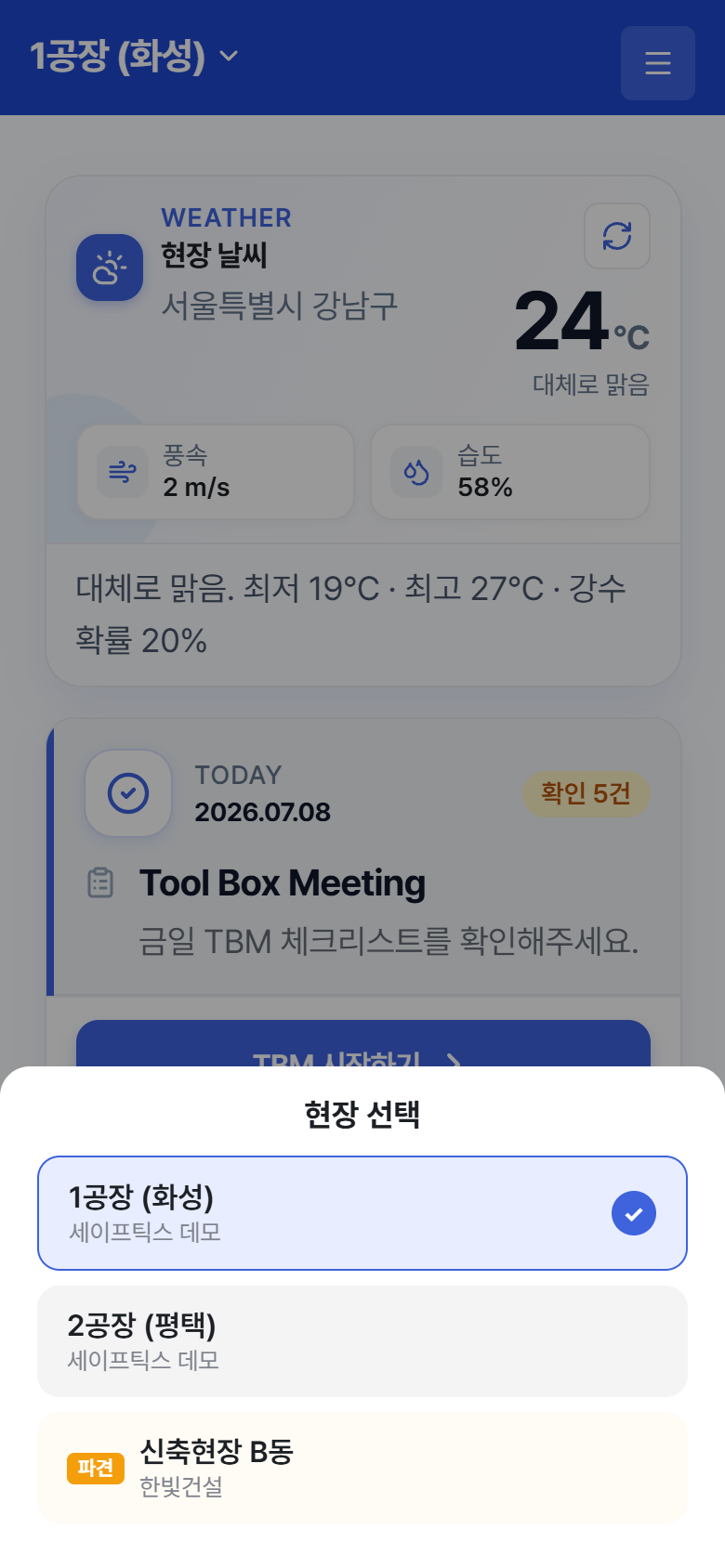
"Select a Site" – opens when you tap the site name at the top of Home

“Select a Site” – opens when you tap the site name at the top of Home

  1. Tap the site name ▼ at the top of Home. (If you belong to only one site, there is no ▼ and nothing to switch.)
  2. Tap the site you want in the Select a Site list. The current site is marked with ✓.
  3. Sites you belong to through dispatch carry an orange Dispatch badge.

Tip

When you switch sites, today’s TBM, TBM records, and suggestions all change to the selected site. Viewing the wrong site is the most common reason for “I can’t see today’s TBM.” You can also switch sites from the Settings screen. External workers are fixed to the single site of their access code.

← Previous1.5 Understanding the LayoutNext →2.1 Start Today’s TBM
Safetics Safetics

Robot safety made simple

Product

SafetyDesigner Pricing

Guides

SafetyDesigner Guide TBM Guide

Resources

Insights FAQ Glossary

Company

Safetics Home Contact Us

Safetics Inc. · CEO : Heonseop Shin · Business Reg. No. 693-87-01568 · 2F, 43, Bongeunsa-ro 30-gil, Gangnam-gu, Seoul, Republic of Korea · Tel : 82-2-568-7985 · info@safetics.io

© 2026 Safetics, Inc.

Image you just passed