
Skip to content
Help Center

Help Center

Safetics
⌘K
Home Open SafetyDesigner
🇺🇸 English
English 한국어

TBM App

  • Key Terms & Concepts
  • 1.1 Installation & Requirements
  • 1.2 Log In — Regular Workers (ID Login)
  • 1.3 Log In — External Workers (Access Code Login)
  • 1.4 Biometric & Auto Login
  • 1.5 Understanding the Layout
  • 1.6 Select a Site (Multiple Sites)
  • 2.1 Start Today’s TBM
  • 2.2 Answer the Checklist
  • 2.3 Complete Participation — Signature
  • 2.4 Complete Participation — Location Check (Geo-Fence)
  • 2.5 View Past TBM Records
  • 3.1 Submit a Suggestion
  • 3.2 View & Reply to Suggestions
  • 3.3 Accept/Decline Dispatch Invites
  • 3.4 Notification Settings
  • 3.5 Change Language (Korean/English)
  • 3.6 Log Out & Delete Account
  • 4.1 Report a Hazard
  • 4.2 Emergency SOS
  • 4.3 Request a Work Stop
  • 4.4 When You Can’t Log In
  • 4.5 When Location Check (Geo-Fence) Fails
  • A. Frequently Asked Questions (FAQ)
  • B. Features by User Type
  • C. Glossary
  • D. Error Message Reference
← Back

2.1 Start Today’s TBM

Home or Tool Box Meeting tab All

Open the TBM sent today and start participating. This is the feature you will use the most every day.
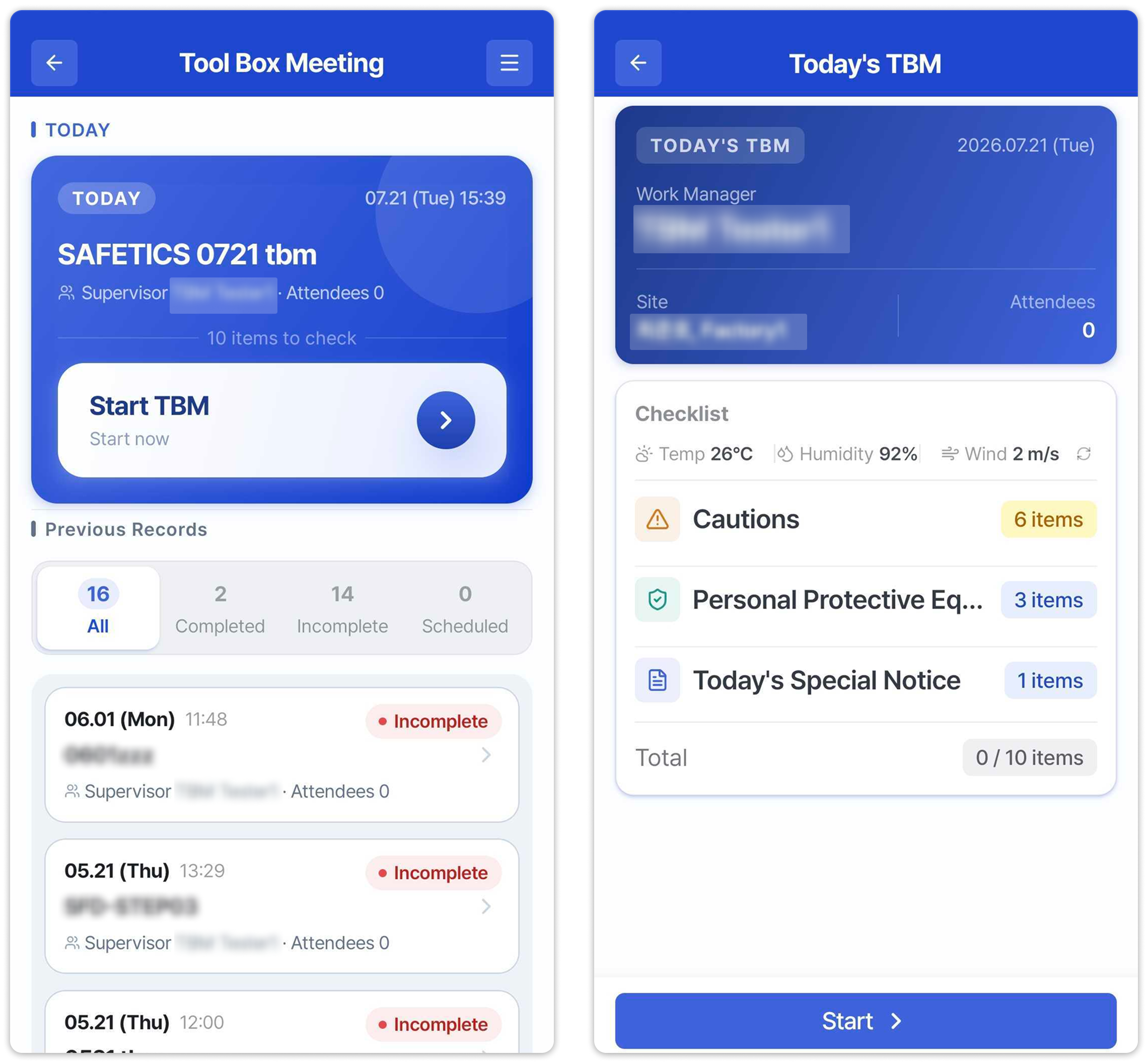
Left: Tool Box Meeting list (TODAY card) / Right: pre-start summary screenLeft: Tool Box Meeting list (TODAY card) / Right: pre-start summary screen

Left: Tool Box Meeting list (TODAY card) / Right: pre-start summary screen

  1. Tap the Today’s TBM card on Home, or go to Tool Box Meeting in the menu and, on the TODAY card, tap Start TBM.
  2. Review today’s details on the summary screen: work supervisor / site / attendees, plus the checklist makeup — item counts for precautions, personal protective equipment (PPE), and today’s special notice.
  3. Tap Start at the bottom to begin the checklist (2.2 Answer the Checklist).

Warning

  • Before the start time, “You can participate from {time}” is shown in place of the button and it cannot be tapped.
  • If there is no TBM today, “No TBM schedule is registered for today.” is displayed — check with your Admin whether one was sent.
  • If you belong to multiple sites, first make sure you are viewing the right site (1.6 Select a Site (Multiple Sites)).
← Previous1.6 Select a Site (Multiple Sites)Next →2.2 Answer the Checklist
Safetics Safetics

Robot safety made simple

Product

SafetyDesigner Pricing

Guides

SafetyDesigner Guide TBM Guide

Resources

Insights FAQ Glossary

Company

Safetics Home Contact Us

Safetics Inc. · CEO : Heonseop Shin · Business Reg. No. 693-87-01568 · 2F, 43, Bongeunsa-ro 30-gil, Gangnam-gu, Seoul, Republic of Korea · Tel : 82-2-568-7985 · info@safetics.io

© 2026 Safetics, Inc.

Image you just passed